


Shopping Cart
There are no more items in your cart
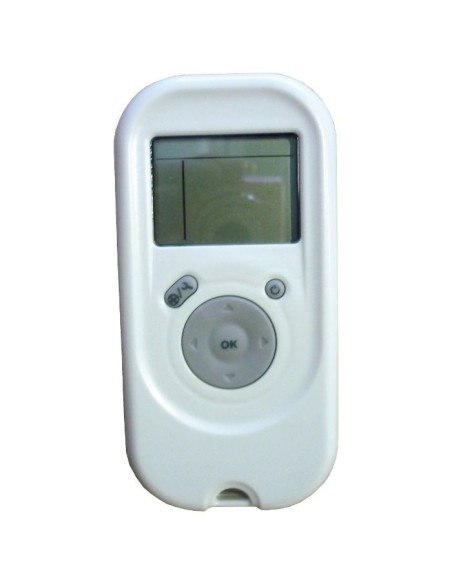

PRO digital remote control cleaning robots - 99954226-ASSY
Maytronics
99954226-ASSY
€119.00
Tax included
New replacement Dynamic PRO remote control for your Dolphin cleaner.
Original Dolphin replacement, compatible with the models:
Dynamic Plus;
Ultrakleen;
Pro X e Pro X 2;
Luminous;
Master M5;
Thunder 30;
Supreme M5, M5 Pro e M5 Liberty;
Zenit 30 e Liberty;
Pulit E90;
Wave 80 e 100;
2x2;
Mega:
Kaptur 500;
Maximus X90;
DX6.
With the remote control it is possible to set different cleaning programs of the robot and drive it inside the pool.
12 MONTHS WARRANTY
The Remote Control Unit (RCU) offers two operation modes: Automatic mode and Manual direction mode. In Automatic cleaning mode, In automatic mode, the cleaning parameters can be changed. In Manual direction mode, the robots motion can be controlled manually.
Manual Direction Control Mode
Press the On/Off button once. The remote control will start in manual direction control mode.
Use the direction control arrows to control the movement of the robot around the pool.
To exit the manual direction control mode, press the Manual/Automatic select button once only.
Setting the Automatic Mode
To Change the Automatic Mode settings First press the Manual/Automatic select button, then set according to the following table:
NOTE:
When choosing the fast cleaning cycle the pool cleaner will not climb walls.
After 2 minute if no button is pressed, the Remote Control Unit will shut-down and the Pool cleaner will continue to work in the previous settings.
When the "Ultra-Clean" and "Walls Only" options finish their cycles, the Pool Cleaner will return to default settings.
New replacement Dynamic PRO remote control for your Dolphin cleaner.
Original Dolphin replacement, compatible with the models:
Dynamic Plus;
Ultrakleen;
Pro X e Pro X 2;
Luminous;
Master M5;
Thunder 30;
Supreme M5, M5 Pro e M5 Liberty;
Zenit 30 e Liberty;
Pulit E90;
Wave 80 e 100;
2x2;
Mega:
Kaptur 500;
Maximus X90;
DX6.
With the remote control it is possible to set different cleaning programs of the robot and drive it inside the pool.
12 MONTHS WARRANTY
The Remote Control Unit (RCU) offers two operation modes: Automatic mode and Manual direction mode. In Automatic cleaning mode, In automatic mode, the cleaning parameters can be changed. In Manual direction mode, the robots motion can be controlled manually.
Manual Direction Control Mode
Press the On/Off button once. The remote control will start in manual direction control mode.
Use the direction control arrows to control the movement of the robot around the pool.
To exit the manual direction control mode, press the Manual/Automatic select button once only.
Setting the Automatic Mode
To Change the Automatic Mode settings First press the Manual/Automatic select button, then set according to the following table:
NOTE:
When choosing the fast cleaning cycle the pool cleaner will not climb walls.
After 2 minute if no button is pressed, the Remote Control Unit will shut-down and the Pool cleaner will continue to work in the previous settings.
When the "Ultra-Clean" and "Walls Only" options finish their cycles, the Pool Cleaner will return to default settings.
- Robot family
- 2x2 Gyro
Dynamic · Pro X · Wave 100
Liberty · Zenit Liberty · Supreme M5 Liberty
M400 · M500 · Supreme M4 · M5
Magic · Luminous
Master M5 · Thunder 30
Supreme Bio S - Robot series
- Commercial & professional
M Series, Supreme & Zenit
Master, Thunder & older ranges - Fitment note
- Several versions exist: please compare the part number on your old part before ordering.
Tap to zoom
